FAQ & Troubleshooting
Wheel of Names Not Saving? How to Fix It
There's no Save button; entries auto-persist to your browser as you type. Here's what's really going on when a wheel appears to reset.
Key takeaways
- There's no "Save" button for your current wheel: your entries, colors, and settings save automatically to your browser as you type, so "not saving" almost always means something cleared or blocked that storage.
- Sending a wheel to someone else or opening it on another device is a separate action (generating a share link), which has its own size and rate limits.
- If the wheel itself won't load or spin at all, that's a different problem: see Wheel of Names Not Working?
How saving actually works here
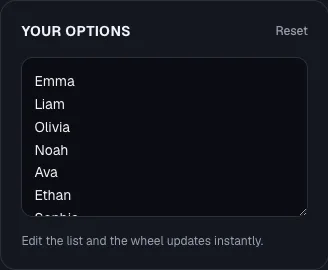
It's worth knowing this up front, because it changes what "not saving" usually means.
Your current wheel (entries, colors, sounds, title) is saved continuously and automatically to your browser's local storage as you edit it.
There's no explicit "Save" button to click and no risk of forgetting to save; every change is written immediately.
That means when someone says "my wheel isn't saving," it's almost never a failed save action.
It's local storage getting cleared, blocked, or not carried over to wherever they're looking for the wheel next.
Why your wheel might have reset or disappeared
- Private/incognito browsing. Local storage in a private window is wiped when you close it, so a wheel built in incognito mode won't be there next time, by design.
- Cleared browser data. If you (or your browser's auto-cleanup settings) recently cleared cache/cookies/site data, that clears local storage too, which resets you back to the default wheel.
- A different browser or device. Local storage doesn't sync: it's tied to one browser on one device. Opening the site in a different browser, or on your phone instead of your laptop, shows a fresh local wheel, not the one you built elsewhere.
- Strict privacy/cookie settings. Browser settings or extensions that block site storage can silently prevent entries from persisting, even though nothing looks broken on screen.
- More than 500 entries. The editor caps a wheel at 500 entries; if a paste pushes you over that, the extra entries are trimmed rather than saved, which can look like "some of my entries disappeared."
If you need a wheel to follow you across devices, use Share instead
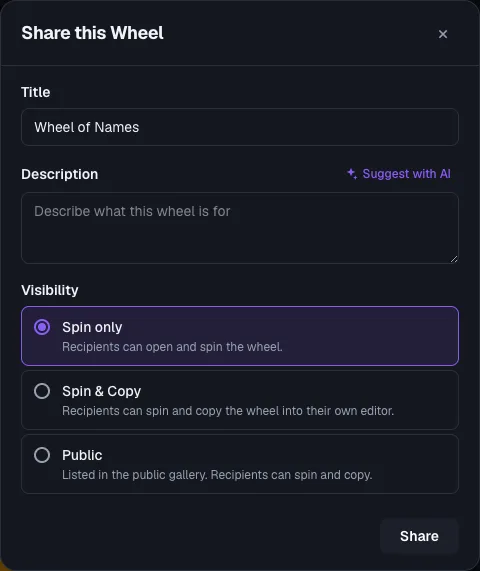
Local storage only covers "the same browser, later." To get a wheel onto another device, or send it to someone else, use the Share option instead.
It generates a link backed by the server, not your browser. A few specifics:
- Sharing doesn't require creating an account; anyone can generate a share link.
- There's a size limit: a wheel over roughly 1 MB (usually from embedded images) will show "This wheel is too large to share. Remove some images to reduce its size below 1 MB." Remove or shrink images and try again.
- There's a rate limit on how quickly you can create shares in a row. If you hit it, you'll see "You're sharing too quickly. Please wait a moment and try again," so wait a few moments and retry.
- To see a running list of your own past shared wheels, you need to be signed in when you view My Shares. An anonymous share link still works for anyone who has it, but it won't show up in a personal list unless you were signed in.
Quick checklist
- Confirm you're not in a private/incognito window.
- Confirm you're on the same browser and device you used before.
- Check whether your browser recently cleared site data, or has strict cookie/storage-blocking settings enabled for this site.
- If you're missing entries rather than the whole wheel, count them: 500 is the cap, and 100 for entries with images.
- If you actually need cross-device access, generate a Share link instead of relying on local storage, and keep the link somewhere safe (or stay signed in and check My Shares).
Frequently asked questions
- Do I need an account for my wheel to be reliable?
Not for using the wheel on one browser: that's automatic either way. An account only matters if you want a personal list of every wheel you've shared, via My Shares.
- Can I back up my entries so I'm not relying on local storage?
Yes. Keep your list in a spreadsheet or text file so you can quickly re-paste it if a browser data-clear resets your local wheel.
This also sidesteps the 500-entry cap concern since you'll know exactly what you're pasting back in.
- Is this a widespread bug, or specific to my setup?
It's almost always specific to browser/privacy settings (private mode, cleared data, a different device) rather than a save action failing. Work through the checklist above before assuming something's broken.