Classroom & Teacher Guides
Wheel of Names Classroom Activities and Games
A wheel of names is a picker by default, but teachers who use it regularly treat it as a general-purpose randomization engine.
The format changes with what you load onto it.
Key takeaways
- The wheel works as a lightweight game engine, not just a name picker. Swap what's on it (names, prompts, vocabulary, activities) to run entirely different formats.
- A mystery mode, hiding slice labels or the winner until reveal, turns an ordinary pick into a suspense-driven game format most teachers don't know exists.
- Activities below are grouped by purpose so you can match one to a specific lesson need in under a minute, assuming you've already saved a base wheel.
Review games
Category spinner: load subject categories (vocabulary, dates, formulas) instead of names, and spin to pick which category the next question comes from. This keeps review sessions varied.
Vocabulary/term wheel: load key terms from a current unit and spin to pick which term the class defines or discusses next.
One documented example from a history classroom loaded terms like George Washington, Continental Army, and Saratoga for a Revolutionary War review.
Order was unpredictable rather than following the textbook sequence (Differentiated Teaching).
Team turn-taking: load team names and spin to decide which team answers each question in a review competition.
Form the teams first with a team generator wheel if you don't already have fixed teams.
Speed-round picker: load student names and spin rapidly through a set number of quick-fire questions.
Drop each student's weight to 0 after they've answered once so no one goes twice before everyone's had a turn.
ESL and language-practice drills
ESL teachers use wheel-based drills specifically to force spoken production practice that students might otherwise avoid. Two documented formats (Charlie's Lessons, "10 Easy ESL Games & Activities"):
- Sentence-production wheel: load target vocabulary (e.g. modes of transport: bus, train, plane) and have the student form a sentence using that word in whatever verb tense the lesson covers.
- Introduce-a-classmate wheel: load student names. Each spin, the class introduces the selected student by sharing three facts about them, for points. This doubles as a low-stakes icebreaker and a speaking-practice drill.
Icebreakers
Two-truths-and-a-spin: spin to pick who shares next in a two-truths-and-a-lie icebreaker, keeping the order random instead of predictably going around the room.
Would-you-rather warm-up: load "would you rather" prompts for a quick discussion warm-up. The would-you-rather wheel is a ready-made prompt set if you don't want to write your own list.
Get-to-know-you questions: load open discussion questions and spin at the start of a term.
This helps a new class get comfortable speaking in front of each other before academic content raises the stakes.
Movement and brain breaks
Brain break wheel: load short physical activities (jumping jacks, a stretch, a quick walk to the door and back).
Spin between lessons or after a long stretch of seated work.
It works as a genuine attention reset rather than a five-minute free-for-all.
Workout wheel: for PE or activity-based classes, load a set of exercises and spin to build a quick circuit.
The workout wheel is a ready-made option if you don't want to type one out.
Writing and discussion prompts
Prompt-of-the-day wheel: load writing prompts and spin each morning for a warm-up journal entry.
Some teachers share the wheel link directly so each student spins individually and gets their own random prompt, rather than the whole class writing to the same one (Differentiated Teaching).
Discussion-starter wheel: for literature or social studies discussions, load open-ended questions tied to the current unit.
Spin to choose the day's focus question instead of the teacher picking (and unintentionally signaling which question they think matters most).
Hybrid and remote-classroom fairness
For a class split between in-person and remote students, run two separate wheels, one per group, and alternate between them.
This is a specific, documented fix for a real problem: remote students getting less attention simply because they're less visually present in the room (Charlie's Lessons and other hybrid-teaching write-ups).
The feature most teachers miss: mystery mode
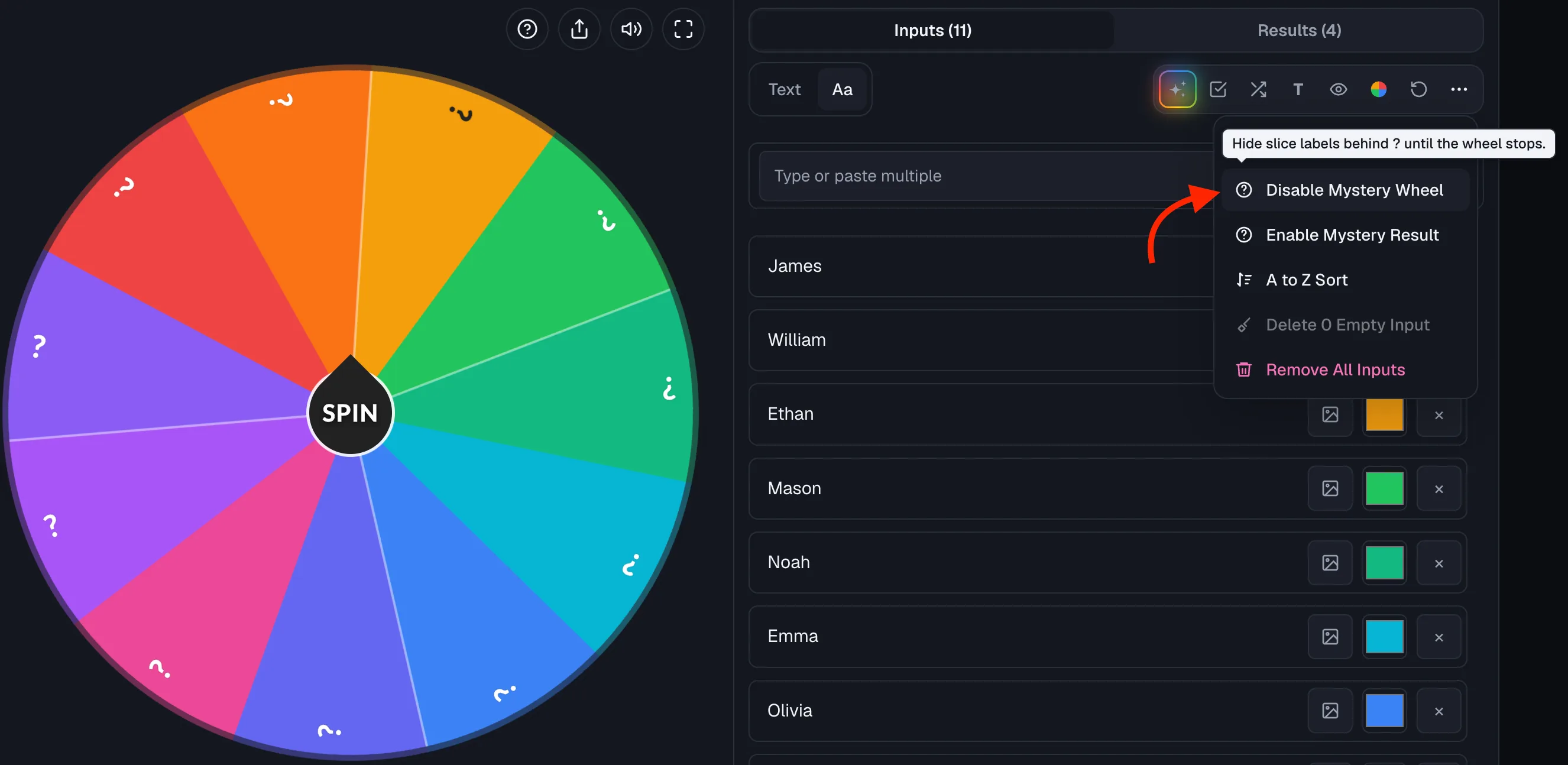
Beyond a standard spin, the wheel engine supports two hidden-reveal modes worth building into a game format rather than treating as a novelty.
Both are toggled in the full editor's settings on the homepage.
The classroom tool page doesn't expose the toggle, but a wheel saved with mystery mode on will still show it wherever it's opened:
- Mystery wheel hides every slice label behind a "?" until the wheel stops. Useful for a suspense-driven review game where students don't know what category or prize a slice represents until it's landed on.
- Mystery result hides the winner in the result dialog until you choose to reveal it. Useful for building suspense before announcing a raffle winner or a randomly selected presenter, especially with a class watching a shared screen.
Both modes are opt-in
Both are opt-in settings, not the default, so a standard visible wheel remains the right choice for most day-to-day cold-calling.
Setting up an activity wheel
- Decide what's going on the wheel (names, prompts, vocabulary, activities). Keep it single-purpose rather than mixing categories, so a spin's result is never ambiguous.
- Type or paste entries into a random wheel generator.
- In the full editor, adjust weight per entry if some options should come up more or less often than others. Equal weight is the default and is usually right for fairness-driven picks.
- Save the wheel with a clear, specific name (e.g. "Brain Break Wheel," "Unit 3 Discussion Prompts") so you can reopen it without rebuilding it next time. See how to customize and save your wheel for the full save/backup/share options.
Ready to try it yourself?
Open the toolFrequently asked questions
- Can I combine names and activities on the same wheel?
You can, but it's clearer to keep them separate, one wheel per purpose, so a spin's result is never ambiguous.
A slice could otherwise happen to match both an activity name and a student's name, for example.
- How many entries should a classroom activity wheel have?
Enough for meaningful variety without making any single slice too small to read. 8 to 20 entries works well for most classroom activities on a projector.
The tool supports up to 500 entries, but readability suffers well before you hit that ceiling.
Past about 100 slices there is no room to draw a label at all, so the wheel shows colour bands and names the winner in the result panel instead.
- Are there ready-made activity wheels I don't have to build myself?
Yes. Purpose-built wheels already exist for several of the formats above, including the would-you-rather wheel and workout wheel, which save you from typing out a prompt list from scratch.
- Is mystery mode appropriate for younger students?
It works well for review games and prize reveals at any age.
But for a cold-calling context where a student needs to know they've been picked in order to prepare a response, keep results visible.
Save mystery mode for games, not daily participation picks.
Sources
- Differentiated Teaching: Wheel of Names, A Fun Way to Transform Your Teaching
- Charlie's Lessons: Wheel of Names Tutorial, 10 Easy ESL Games & Activities