Classroom & Teacher Guides
10 Ways Teachers Use Wheel of Names
Cold-calling is what most teachers reach for first, but teachers who've documented their own classroom workflows use a spinning wheel for a much wider range of tasks.
Key takeaways
- Cold-calling is the obvious use, but teachers documenting their own classroom workflows use a wheel for at least ten distinct purposes, from ESL sentence drills to hybrid-classroom fairness.
- A 2013 study found cold-calling raised voluntary participation 60% over a school year. The wheel is what makes that practice feel fair rather than arbitrary.
- Most of these ideas reuse the same saved wheel; only the contents (names, prompts, activities) change between them.
1. Cold-calling, done fairly
The core use case: spin to pick who answers next, so every student has an equal, visible chance instead of the teacher unconsciously defaulting to the same confident hands.
This isn't just a fairness nicety.
A 2013 Northeastern University study of 16 college classrooms found that cold-calling raised voluntary participation by 60% over an academic year, compared with volunteer-only classrooms.
A 2019 study found it closed a gender gap in who spoke during discussion (Edutopia, 2023).
The wheel matters here specifically because it makes the randomness visible: students see the pointer land, not just hear a name announced.
See how to use wheel of names in the classroom for the full setup.
2. Forming groups and pairs
Spin repeatedly to build teams or partners for group work.
Teachers using this method typically remove a name after it's picked, either deleting the entry or dropping its weight to 0 in the full editor.
That way the wheel doesn't repeat anyone until the group is full, then reset the list for the next grouping (Differentiated Teaching).
3. Deciding turn order for games and presentations
For games, project presentations, or "who goes first" debates, one spin at the start of class settles it instead of eating five minutes of negotiation.
This is one of the most commonly cited uses in teacher write-ups of the tool (Vestal's 21st Century Classroom).
4. Rotating classroom jobs and helpers
Instead of a fixed rotation list for line leader, materials handler, or tech helper, some teachers spin for the day's helper.
The classroom jobs wheel is preloaded with ten of these roles, so it is ready to spin without typing a list first.
It keeps a routine chore feeling like a small privilege rather than an obligation students track by memorized order.
5. Vocabulary and content review
Load the wheel with content instead of names. One documented example: filling the wheel with terms from a Revolutionary War unit (George Washington, Continental Army, Saratoga).
Then spin to pick which term the class defines or discusses next (Differentiated Teaching and other teacher write-ups).
The same pattern works for any vocabulary set, spelling list, or unit review.
6. ESL and language-practice drills
ESL and language teachers use wheel-based drills specifically: put transportation words (bus, train, plane) on a wheel.
Then have students produce a sentence using that word in a target verb tense.
Or put student names on a wheel where each spin has one student introduce another by sharing three facts about them (Charlie's Lessons, "10 Easy ESL Games & Activities").
The random element forces production practice on vocabulary students might otherwise avoid using.
7. Writing and discussion prompts
Fill the wheel with prompts instead of names, and spin to pick the day's warm-up writing topic or discussion question.
Some teachers share the wheel link directly with students so each spins individually and gets their own random prompt, rather than the whole class getting the same one (Differentiated Teaching).
8. Review-game turn-taking
In a review game (trivia, vocabulary quiz, math-facts drill), the wheel picks which student or team answers each question.
This keeps the pace fast, since no one has to debate whose turn it is.
And it keeps the selection visibly fair across a whole game, not just a single question.
9. Hybrid and remote-classroom fairness
For classrooms split between in-person and remote or virtual students, some teachers run two separate wheels, one per group, and alternate between them.
This specifically makes sure remote students get equal attention rather than being forgotten because they're less visually present (Charlie's Lessons and other hybrid-teaching write-ups).
10. Staff meetings and adult teams
The same mechanism works for adults. Departments and staff teams use a wheel to decide meeting order, who leads a discussion, or who takes notes.
Outside the classroom entirely, this is really a team generator wheel use case wearing a teacher hat.
Getting started
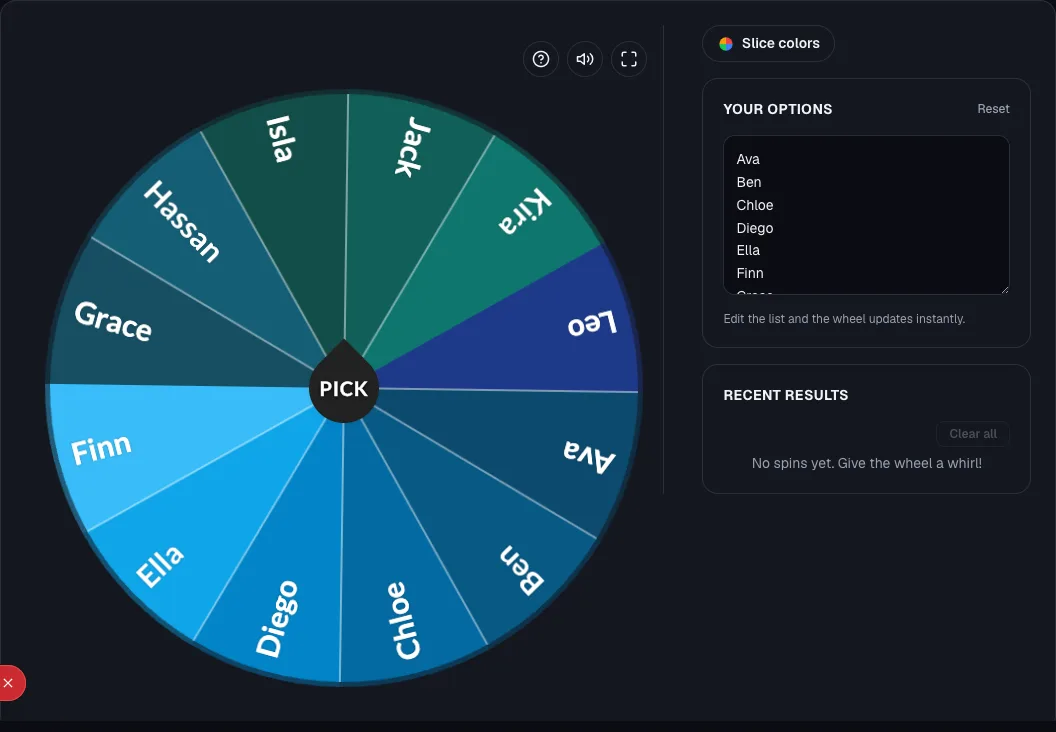
Most of these ten ideas only require swapping what's on the wheel (names, vocabulary terms, or prompts) using the same underlying setup.
Build your first wheel with the random student picker, or read how to use wheel of names in the classroom for the full walkthrough.
For more structured, subject-specific activity ideas, see wheel of names classroom activities and games.
Ready to try it yourself?
Open the toolFrequently asked questions
- Do I need a different tool for each use case (names vs. prompts vs. vocabulary)?
No. The wheel just spins whatever text entries you give it. Swap the contents between uses; the mechanism (add entries, spin, get one result) stays identical.
- How do I keep it from feeling repetitive if I use it every day?
Vary what you're spinning for instead of using it only for cold-calling, and occasionally change the colors or images on the wheel.
Small visual variety keeps it feeling fresh for students who see it daily.
- Is this appropriate for younger grades, or mainly secondary school?
It works across grade levels. For younger students, build the wheel in the full editor and add a photo or icon per entry so pre-readers can follow along.
Reserve the wheel for lower-stakes picks like turn order rather than graded, high-pressure participation.
- Can I run the same wheel across multiple class periods with different rosters?
Save one wheel per class or period rather than editing a single wheel's list between periods. It's faster and prevents accidentally spinning the wrong roster.
Sources
- Edutopia: Does Cold Calling Work? Here's What the Research Says (2023)
- Differentiated Teaching: Wheel of Names, A Fun Way to Transform Your Teaching
- Vestal's 21st Century Classroom: Ways to Use Wheel of Names in the Classroom
- Charlie's Lessons: Wheel of Names Tutorial, 10 Easy ESL Games & Activities